If you’re reading this, then odds are that you’re shopping for a new keyboard. Maybe you spilt coke over your old one, wore down the ‘WASD’ keys from playing too much Counter Strike… Or maybe you smashed it to pieces after rage-quitting Cuphead.
No matter what happened to your last, you’re going to need your next. Thanks to Corsair, I’ve been clacking away on the K70 CORE TKL Wireless RGB Mechanical Gaming Keyboard for the last month, and let me tell you, it’s hard to fault.
Overview

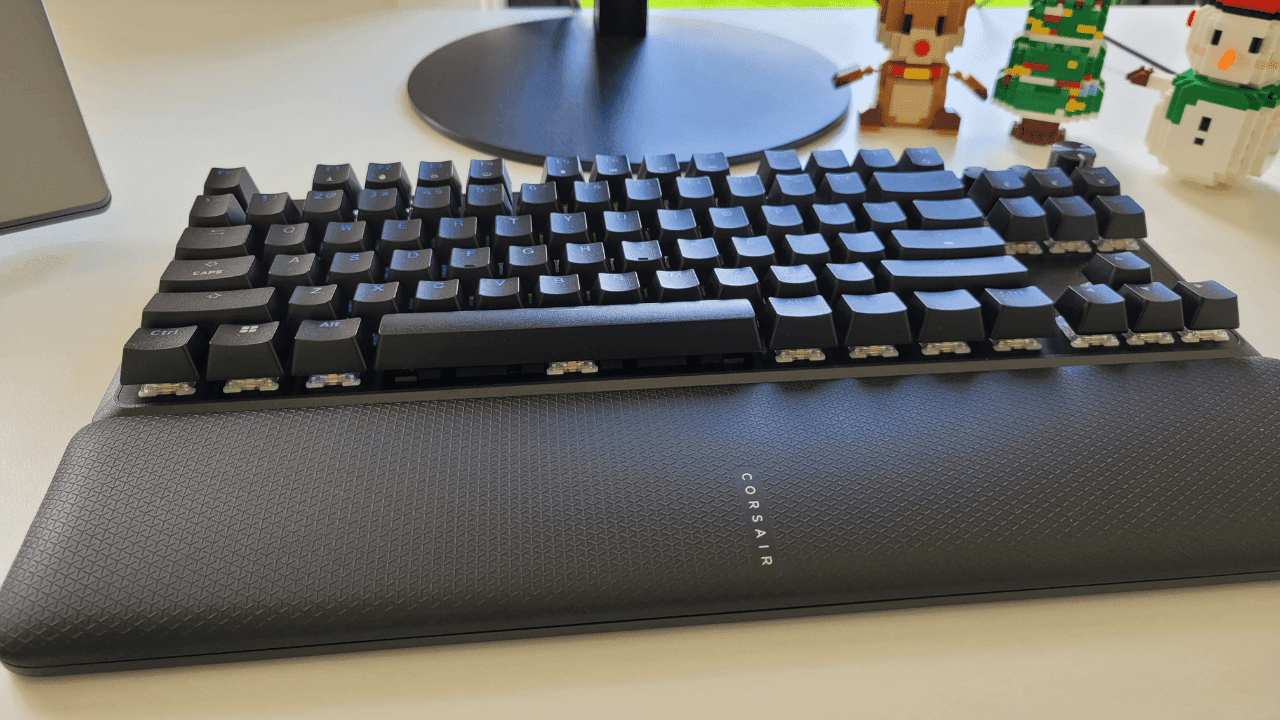
The K70 CORE TKL is designed to add a bit of flair to your set-up, with its programmable LED backlighting, ASMR keystrokes, and smaller footprint. It also delivers on functionality, with wired, wireless, and Bluetooth connectivity, as well as magnetic hall-effect sensors and a versatile wrist pad.
Set-up was a breeze, with easy to follow on-screen instructions once it was connected via bluetooth. It had some charge right out of the box, but it’s recommended to give it a few hours of juice before you start using it to type up your thesis.
The majority of my time with the peripheral has been daily home office use, with a fair few late night gaming sessions for good measure.
READ MORE: Review | Nanoleaf 4D Screen Mirror + Lightstrip Kit
Functionality

With wired, wireless, and Bluetooth connectivity options, the K70 CORE TKL has all bases covered. For optimal speed, stability, and latency, wired is obviously the best choice, but for portability and convenience of use, the wireless connection is the way to go.
The main keypad features magnetic hall-effect sensors for rapid keypresses, though that doesn’t extend to the function row or arrow keys, which are linear switches. As well as being able to adjust key actuation, the keyboard also has ‘rapid trigger’ and ‘multipress’ functions within the icue software, providing a high level of customisation.
The tenkeyless (TKL) design means that it lacks the traditional numerical keypad on the right hand side of the board, which could be seen as a pro or a con depending on what functionality you require from your keyboard. I don’t often use the numerical pad, so I didn’t mind its absence, and that little bit of extra space on my desk was a welcome trade-off. Being a ‘gaming’ keyboard, I’m sure that most users would feel the same.
READ MORE: Review | PlayStation 5 Pro ‘Perfect Power At A Price’

The included wrist pad is soft to the touch and its non-slip texture felt good on my wrists. It snaps automatically to the keyboard thanks to a magnetic strip, which makes moving or removing the pad all too easy. The snapping also stops the pad from moving around while you hurriedly type up that late report or furiously hammer the WASD in your favourite game. The flexibility of being able to remove the wrist pad, or use a different one altogether — an orthopaedic pad, for example — is a welcome feature.
The K70 CORE TKL features a rotary dial — or as I like to call it ‘a big knob’ — which has volume control and ‘press to mute’ mapped to it by default. There are shortcuts to swap the knobs’ function, such as controlling the brightness of your backlighting, scrolling vertically or horizontally, and zooming in and out… To be honest though, I preferred to just keep it set to volume control.
There’s also a customisable ‘media’ button which was handy for pausing and playing music or videos, and a ‘game mode’ button which, (to my eyes) didn’t do much more than disable the windows key.
READ MORE: Review | GuliKit KK3 MAX Wireless Controller
Aesthetics

The K70 CORE TKL has a sleek black elegance to it, with a solid plastic body, bevelled edges, and a brushed aluminuium top plate. Though of course under that tuxedo is a bombastic Hawaiian shirt; with individual LEDs under each key, lighting up the board in a rainbow of RGB.
It’s a fun bit of flair that is highly customisable; you have control of brightness and colour saturation as well as various lighting presets at your disposal. I love watching the waves of colour ripple across the keys — especially at night — it’s like my own personal fireworks show. The floating switch design of the keyboard helps to really showcase the lighting, which even shines through the lettering on the keycaps. The only real downside is having to remember the shortcuts for the fifteen different lighting presets.
The keys themselves felt pleasant under my fingertips, even when typing for hours at a time. They also felt light and responsive, not needing much force to press at all, making touch typing quicker and easier. You can customise this even more by reducing the key actuation within the icue software. It should be noted that the keycaps are not hot-swappable, meaning you can’t change them out for different switches, which limits how much you can further customise the look of your board.
READ MORE: Review | SteelSeries Arctis GameBuds ‘Comfort and Connectivity’

A big draw card of mechanical keyboards is the ASMR like sounds the keys make as you type; the rhythmic clacking can be soothing in the same way the pattering of rain on your roof at night can be. The soundscapes even have their own little sub-categories, like ‘creamy’, ‘clacky’, and ‘thocky’. While I’m no expert, I’d say the K70 CORE TKL keystrokes sounds are somewhere between creamy and thocky.
The key sounds aren’t overly loud, but I could still hear them through my noise-cancelling headphones — not in an annoying way, more like the audio cue that I’d actually hit the button was still there.
Should you buy the Corsair K70 CORE TKL wireless keyboard?

With a dizzying amount of keyboard options on the market, it can be a hard task to whittle it down to just one. The K70 CORE TKL is a really solid option that, in my opinion, would serve the majority of users really well.
The LED lighting never fails to delight, washing your desk in a glow of colour at night, the keystroke sounds are really aesthetically pleasing, almost meditative at times, and I was really impressed with the magnetic snapping wrist pad.
The only real negative I could find was that the key caps aren’t hot-swappable, which I imagine, wouldn’t bother the majority of users.
Whether you’re replacing, upgrading, or buying as a gift; the K70 CORE TKL Wireless RGB Mechanical Gaming Keyboard is a strong contender for your money.
The K70 CORE TKL retails for $249.00 AUD and can be found at Aussie retailers Scorptec, PC Case Gear, and Centre Com.
The K70 CORE TKL Wireless RGB Mechanical Gaming Keyboard was supplied to Quest Daily for the purpose of this review. Quest Daily has no affiliation with the product purchase pages shared above and does not receive any commission from the sale of the product.
Love what we do? Consider donating to keep this site running